HCPCS Codes for Equipment: What They Mean for Billing
- Qubit Technology
- 1 day ago
- 12 min read

An HCPCS code for medical equipment is a five-character alphanumeric identifier used on insurance claims to tell payers exactly what product a patient received. For equipment specifically, you are working with HCPCS Level II codes, the standardized national system that covers durable medical equipment, prosthetics, orthotics, and supplies (DMEPOS). Getting the code right is not a formality. It determines whether a claim processes, how much gets paid, and whether an audit finds a problem.
Here is what you need to know before going further:
Check the leading letter first. It signals the code category and narrows your search immediately.
Confirm payer coverage separately. A code existing in the HCPCS set does not guarantee payment.
Attach a CMN or physician order when the payer requires it. Missing documentation is the most common denial trigger.
Use effective dates. Billing with an expired or not-yet-active code causes processing failures.
Pro Tip: Before you bill a single claim, pull the CMS HCPCS file and confirm both the short description and the effective date for the code you plan to use. Two minutes of verification prevents weeks of denial follow-up.
Table of Contents
How to read an HCPCS Level II code: format and common prefixes
How HCPCS codes work in equipment billing: from product to paid claim
How to find and verify the correct HCPCS code for a piece of equipment
Practical supplier checklist for assigning HCPCS to equipment
What an HCPCS equipment code actually looks like: examples and common categories
Authoritative sources for HCPCS code lookup and policy verification
Why equipment uses HCPCS Level II instead of CPT codes
CPT codes and HCPCS Level II codes are not interchangeable, and confusing them is one of the most common errors billing teams make. The AAFP explains the practical boundary clearly: CPT describes physician services and clinical procedures, while HCPCS Level II describes equipment, supplies, and services that CPT simply does not cover.

The American Medical Association maintains CPT (HCPCS Level I). The Centers for Medicare and Medicaid Services maintains HCPCS Level II and publishes its updates. That split in ownership reflects a split in purpose: Level I was built for physician work, Level II was built for products and non-physician services.
DMEPOS items, ambulance services, certain injectable drugs, and orthotics all live in Level II because CPT has no codes for them. When a supplier ships a wheelchair or a CPAP machine, there is no CPT code to put on that claim. HCPCS Level II is the only option.
Feature | HCPCS Level I (CPT) | HCPCS Level II |
Maintained by | American Medical Association | CMS |
Code format | Five digits (numeric) | One letter + four digits |
Covers | Physician and clinical procedures | Equipment, supplies, drugs, ambulance |
Primary use | Professional and outpatient claims | DMEPOS and supplier claims |
Modifiers | Two-digit numeric | Two-character alphanumeric |
Key distinctions worth keeping in mind:
CPT codes are licensed by the AMA; HCPCS Level II codes are publicly maintained by CMS.
Payers including Medicare, Medicaid, and most commercial insurers require Level II for DMEPOS claims.
Some claims carry both a CPT code (for the service) and a Level II code (for the supply used during that service).
How to read an HCPCS Level II code: format and common prefixes
Every HCPCS Level II code follows the same structure: one letter followed by four digits, such as E0110 or L3000. That leading letter is not decorative. It tells you which category the code belongs to, which immediately narrows your search when you are trying to match a product.
Common equipment-related prefixes and their general categories:
E codes typically cover durable medical equipment such as hospital beds, wheelchairs, walkers, and oxygen equipment.
L codes cover orthotic and prosthetic devices, including braces, splints, and limb prostheses.
K codes are used for items covered under the DME fee schedule when no permanent E code exists, often for newer or transitional items.
A codes include medical and surgical supplies, wound care items, and some transport-related supplies.
B codes cover enteral and parenteral nutrition equipment and supplies.
Beyond the base code, HCPCS Level II supports two-character modifiers that add context payers need to process a claim correctly. A modifier can indicate rental versus purchase, left versus right side, or quantity. Leaving off the right modifier, or using the wrong one, can flip a paid claim into a denial.
Pro Tip: Use the leading letter as your first filter when searching the CMS HCPCS file. If you are sourcing a walker, start with E codes. If you are sourcing a custom ankle brace, start with L codes. You will cut your search time significantly and reduce the risk of landing on a plausible-sounding but wrong code.
How HCPCS codes work in equipment billing: from product to paid claim
The billing workflow for DMEPOS is sequential, and skipping a step is where most denials originate. MLN guidance from CMS makes clear that HCPCS Level II codes are the mechanism payers use to identify what was provided and apply the correct payment rule. Here is the operational flow:
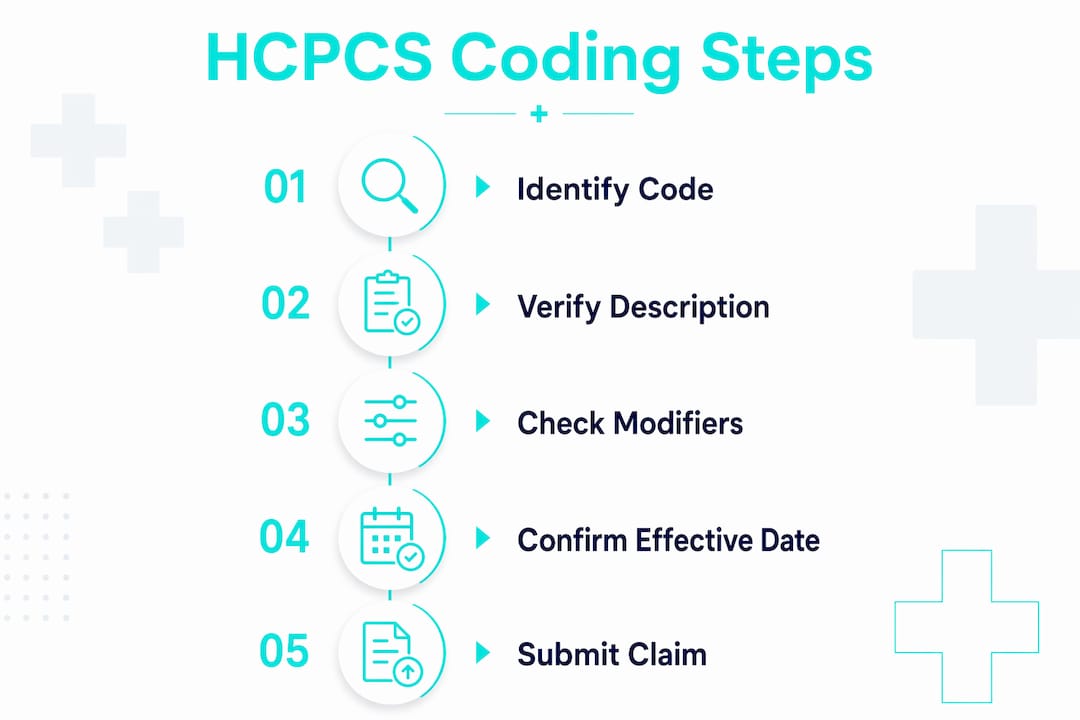
Identify the product’s clinical characteristics. Pull the manufacturer specs: dimensions, materials, intended use, and any FDA classification. These characteristics, not the brand name, determine the correct code.
Search the CMS HCPCS file by keyword and prefix. Match the product’s clinical description to the code’s long description. Read the full description, not just the short one.
Confirm documentation requirements. Many DMEPOS items require a Certificate of Medical Necessity (CMN) or a detailed written order from the treating physician. Check the CMS coverage policy for the specific code.
Check payer-specific coverage and edits. Medicare coverage rules are set by Local Coverage Determinations (LCDs) and National Coverage Determinations (NCDs). Commercial payers have their own policies. A code can exist in the HCPCS set and still be non-covered for a specific diagnosis.
Apply the correct modifiers and place of service. Modifier errors are a leading cause of claim rejections. Confirm whether the item is being rented or purchased, and whether it is being delivered to a home or a facility.
Collect an Advance Beneficiary Notice (ABN) when coverage is uncertain. If there is any chance Medicare will deny the claim, the ABN protects both the supplier and the patient.
Submit the claim and retain documentation. Keep the CMN, physician order, delivery confirmation, and the rationale for code selection in the patient file.
Common pitfalls that trigger denials:
Selecting a code based on brand name rather than clinical characteristics. CMS explicitly states that brand names in code descriptions are for indexing only, not for code selection.
Missing or unsigned CMN when the code requires one.
Wrong place-of-service code paired with a home-use DME item.
Modifier omitted or incorrect for rental versus purchase.
Billing a code whose effective date has not yet started, or one that has been deleted.
A code in the HCPCS set does not guarantee coverage or payment. Payers determine coverage separately, and competitive bidding or specific payer policies can affect reimbursement even when the code is valid.
How to find and verify the correct HCPCS code for a piece of equipment
The right code is not always obvious, and guessing is expensive. Here is where to look and how to verify before you bill.
Start with official CMS sources:
The CMS HCPCS page provides downloadable annual and quarterly code files with full long descriptions, effective dates, and deletion dates. This is the authoritative source for code descriptions.
The HHS Guidance Portal offers HCPCS Release and Code Sets files that include Medicare administrative and pricing data alongside code descriptions.
ResDAC (the Research Data Assistance Center) provides documentation on how HCPCS codes appear in Medicare claims data, which is useful for understanding how codes flow through the system and for research or audit purposes.
Then cross-check with payer sources:
Your Medicare Administrative Contractor (MAC) publishes LCDs and billing articles that specify which codes are covered for which diagnoses, what documentation is required, and what modifiers apply.
Commercial payer portals often list their own coverage policies, which may differ from Medicare’s. Never assume Medicare coverage rules apply to a commercial plan.
MMIT and similar commercial code-lookup services aggregate payer policies and can flag coverage gaps across multiple payers simultaneously, which is useful for suppliers billing across a mixed payer mix.
Step-by-step lookup process:
List the product’s clinical attributes (function, material, size, power source if applicable).
Open the CMS HCPCS file and filter by the appropriate letter prefix.
Read the long description of each candidate code and compare it to the product spec.
Pull the relevant LCD or NCD to confirm coverage criteria and documentation requirements.
Check the effective date. Confirm the code is active for the date of service.
Document your rationale: which file version you used, which coverage policy you reviewed, and why this code fits the product.
Pro Tip: When a product sits between two codes, or when it uses novel technology with no clear match, escalate to the payer’s prior authorization team before billing. A prior auth on file is far less painful than a post-payment audit.
Updates, effective dates, and keeping your code set current
CMS publishes HCPCS Level II updates on a regular cadence, with major releases typically effective January 1 and additional quarterly updates throughout the year. The Alpha-Numeric Editorial Panel, which includes CMS and other stakeholders, reviews requests for new codes, revisions, and deletions. A code can be added, modified, or deleted at any quarterly update, not just annually.
Billing with a deleted code, or with a code whose effective date has not yet arrived, causes immediate processing failures. The fix is straightforward but requires discipline.
Practical ways to stay current:
Subscribe to CMS HCPCS release notices directly from the CMS website. Updates are posted with effective dates and change summaries.
Monitor your MAC’s bulletins. MACs often publish implementation guidance before a new code goes live.
Build a code-set review into your procurement and billing standard operating procedures. Every new product added to your catalog should trigger a HCPCS validation step.
Review payer bulletins quarterly. Commercial payers sometimes adopt new codes on a different schedule than Medicare.
Pro Tip: Maintain a change log in your product master data that ties each SKU to its validated HCPCS code, the CMS file version used, and the effective date. When an auditor asks why you billed a specific code in a specific quarter, that log is your answer.
Practical supplier checklist for assigning HCPCS to equipment
Use this checklist when onboarding a new product or reviewing existing SKUs. It reflects CMS guidance and standard billing practice for DMEPOS suppliers.
Before billing:
Confirm the product’s clinical characteristics match the code’s long description, not just the short description.
Verify the code is active for the date of service (check effective and deletion dates).
Identify whether a CMN or detailed written order is required and obtain it before delivery.
Document medical necessity in the patient record, tied to the treating physician’s order.
Check payer coverage: pull the relevant LCD, NCD, or commercial policy.
Confirm competitive bidding status if billing Medicare in a competitive bidding area.
Apply the correct modifiers (rental vs. purchase, laterality, quantity).
Collect an ABN if Medicare coverage is uncertain.
Operational audit steps:
Pull a random sample of claims monthly and reconcile billed codes to product SKUs.
Track denial reason codes tied to HCPCS mismatches and feed them back into the product master.
Review any claim denied for “code not covered” against the payer’s current LCD to determine whether the diagnosis or documentation was the real issue.
Update the product master whenever a code is revised or deleted.
Require the product manager to record the candidate HCPCS code, the source file version, and the evidence used when onboarding any new SKU.
For suppliers who bundle equipment with service contracts, specify in the contract language who is responsible for coding when the product is delivered as part of a service arrangement. Ambiguity there creates audit exposure for both parties.
Pro Tip: Cross-check new SKUs against the CMS HCPCS file before listing them in your catalog. Catching a code mismatch at the procurement stage costs nothing. Catching it after a payer audit costs significantly more.
What an HCPCS equipment code actually looks like: examples and common categories
A base HCPCS Level II code looks like this: one letter, four digits. E0110 is a format example in the E-code range associated with durable medical equipment. L3000 is a format example in the L-code range associated with orthotics. The letter tells you the category; the digits narrow it to the specific item type, configuration, or size.
Common equipment categories that regularly use HCPCS Level II codes:
Wheelchairs and mobility aids: manual and power wheelchairs, scooters, and related accessories.
Oxygen and respiratory equipment: oxygen concentrators, portable oxygen systems, CPAP and BiPAP devices, and related supplies.
Walkers, crutches, and canes: standard and wheeled walkers, forearm crutches, quad canes.
Prosthetics and orthotics: lower and upper limb prostheses, spinal and extremity orthoses, custom-fabricated and prefabricated devices.
Diabetic testing supplies: blood glucose monitors, test strips, lancets, and related items.
Hospital beds and patient support surfaces: semi-electric beds, pressure-reducing mattresses, and positioning devices.
Code presence is not coverage. Insurers use HCPCS codes as the primary language to identify what a patient received, but payment depends on the payer’s coverage policy, the patient’s diagnosis, and the documentation on file. A valid code on a claim with missing documentation will still be denied.
For context on how these DME categories map to real-world patient needs, the distinction between durable and consumable items matters when deciding which HCPCS prefix to search first.
Key Takeaways
HCPCS Level II codes are the required coding standard for DMEPOS claims in the United States, and accurate code selection, documentation, and payer verification are what separate paid claims from denied ones.
Point | Details |
Use Level II for DMEPOS | HCPCS Level II, not CPT, is required for equipment, supplies, prosthetics, and orthotics on claims. |
Read the leading letter | The first character signals the code category and narrows your product-to-code search immediately. |
Confirm payer coverage separately | A code existing in the HCPCS set does not guarantee payment; check the LCD, NCD, or commercial policy. |
Document before you deliver | CMN, physician order, and medical necessity documentation must be in place before the claim is submitted. |
Queenssurgical as your supply source | Queenssurgical stocks HCPCS-relevant DMEPOS supplies and consumables, supporting procurement teams who need catalog items tied to reimbursable codes. |
The part of HCPCS coding most suppliers get wrong
The conventional wisdom in equipment billing is that finding the right code is the hard part. It is not. The hard part is the step that comes after: confirming that the code you found actually applies to the specific product you are selling, under the specific payer’s coverage rules, for the specific patient’s diagnosis.
Suppliers routinely find a code whose short description sounds close enough and stop there. The long description tells a different story. A power wheelchair code might require a specific drive configuration or weight capacity that the product does not meet. An orthotic code might require custom fabrication when the item is prefabricated. Billing the close-enough code is not a gray area. It is a mismatch, and auditors find mismatches.
The operational habit that actually reduces denials is building the verification step into procurement, not billing. By the time a product is on a claim, the pressure to ship and collect is high. At the procurement stage, there is time to read the full code description, pull the LCD, and confirm the fit. That is where the discipline needs to live.
For teams managing a large catalog, a reimbursement code review tied to the SKU onboarding process is the single most effective structural change you can make. It moves coding from a reactive billing function to a proactive procurement control.
Where to find the right HCPCS code for your equipment
Queenssurgical supplies medical equipment and consumables to healthcare providers, clinics, and purchasing organizations across the Americas. If your team is working through HCPCS code validation for supplies you need to procure, having a reliable source for the physical products is the other half of the equation.
Queenssurgical’s catalog covers DMEPOS-adjacent consumables and supplies, including nitrile examination gloves and disposable lab uniforms, with competitive wholesale pricing for B2B buyers. The platform is built for procurement teams that need to move quickly without sacrificing product quality or compliance alignment. Browse the catalog at Queenssurgical.net and request a quote for your next supply order.
Authoritative sources for HCPCS code lookup and policy verification
These are the primary places to verify code descriptions, effective dates, and payer coverage rules before billing.
Source | Best used for |
CMS HCPCS page | Definitive code descriptions, effective dates, quarterly updates, and file downloads |
HHS Guidance Portal | HCPCS release files with Medicare administrative and pricing data |
CMS MLN guidance (MLN900943) | Claims processing workflow and the role of MACs in HCPCS-coded claims |
ResDAC | Medicare claims data documentation; useful for audit and research on how codes appear in processed claims |
FAIR Health | Consumer and provider billing context; useful for understanding how insurers apply HCPCS codes to payment |
MAC portals (your region) | LCDs, billing articles, and payer-specific coverage rules for Medicare |
Commercial payer portals | Coverage policies that may differ from Medicare; always check the specific payer’s rules |
MMIT | Aggregated commercial payer coverage data; useful for multi-payer billing environments |
For coding decisions involving novel technology, bundled items, or ambiguous product-to-code matches, the CMS HCPCS file and your MAC’s billing articles are the first stop. Payer portals are the second. Commercial tools like MMIT are useful for scale but should never substitute for the primary CMS source. You can also review health IT coding tool alternatives when evaluating commercial lookup platforms for your billing team.
This article provides general information about HCPCS coding for medical equipment and is not a substitute for professional coding, legal, or compliance advice. Verify current code descriptions, coverage rules, and effective dates with CMS and your payers before submitting claims.
Recommended
Comments